
How to Operate Your Moterra Rental Bike Controller
If you are conservative with your battery, you can get close to 5 hours of riding in. Keep it on green and blue on the flats. Use purple and red on the climbs. If you have some fitness, try the climbs on blue and get a workout.
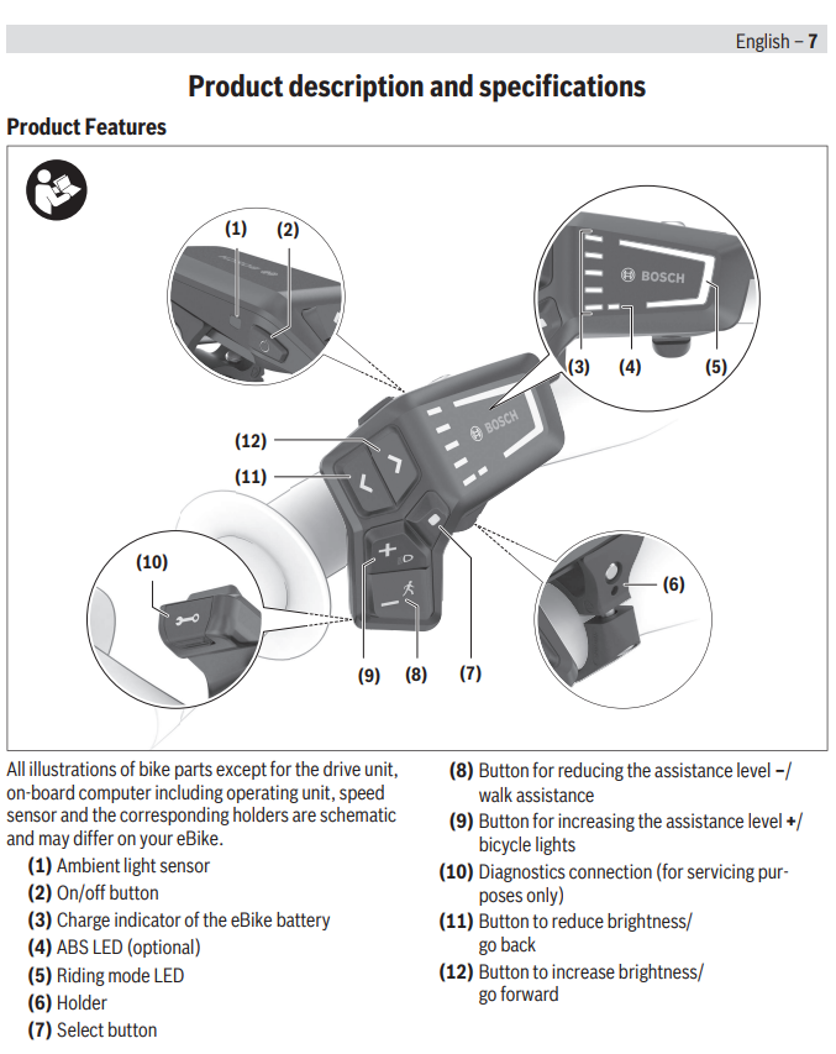
Switching the eBike on/off To switch on the eBike, briefly press the on/off button (2). After the starting animation, the state of charge of the eBike battery is displayed in color with the battery charge indicator (3) and the set riding mode with the (5) display. The eBike is ready to ride. The display brightness is controlled by the ambient light sensor (1). Therefore, do not cover the ambient light sensor (1).
The drive is activated as soon as you start pedaling (except in the OFF riding mode). The drive power varies depending on the riding mode set. As soon as you stop pedaling when in normal operation, or as soon as you have reached a speed of 20/28 mph, the drive switches off the assistance. The drive is automatically reactivated as soon you start pedaling again and the speed is below 20/28 mph. To switch off the eBike, briefly press the on/off button (2) (< 3 s). The battery charge indicator of the eBike battery (3) and the riding mode LED (5) go out. If no power is requested from the drive for approx. 10 minutes (e.g. due to the eBike being stationary) and no button is pressed, the eBike switches off automatically.
Switching the push assistance on/off. The push assistance aids you when pushing your eBike. The maximum speed of the push assistance is 2.5 mph. The manufacturer's default setting can be lower and may need to be adjusted by the bicycle retailer. u The push assistance function must only be used when pushing the eBike. There is a risk of injury if the wheels of the eBike are not in contact with the ground while using the push assistance. u If the selected gear is too high, the drive unit may not be able to move the eBike or activate the roll-away lock. To start push assistance, press and hold the push assistance button (8) for more than 1 s. The battery charge indicator of the eBike battery (3) goes out and a white moving light in the direction of travel shows that it is ready. To activate walk assistance, one of the following actions must occur within the next 10 s: – Push the eBike forward. – Push the eBike backward. – Perform a sideways tilting movement with the eBike.